


Higashihiroshima City AI Garbage Guide(東広島市AIごみナビ)
A new feature, the ‘Higashihiroshima City AI Garbage Guide’, has been added to the Citizen Portal Site.
If you are unsure how to separate your garbage, you can use it to check anytime, 24 hours a day, 365 days a year. The AI instantly determines the appropriate garbage category and suggests how to separate your garbage.
How to Register(登録方法)
(1) Add the Official Higashihiroshima City LINE Account (if you have already added it, proceed to Step (2).)
Registration method: Tap ‘Add Friend’ or scan the QR code.


(2) Register for the Citizen Portal Site (if you have already registered, proceed to Step (3).)
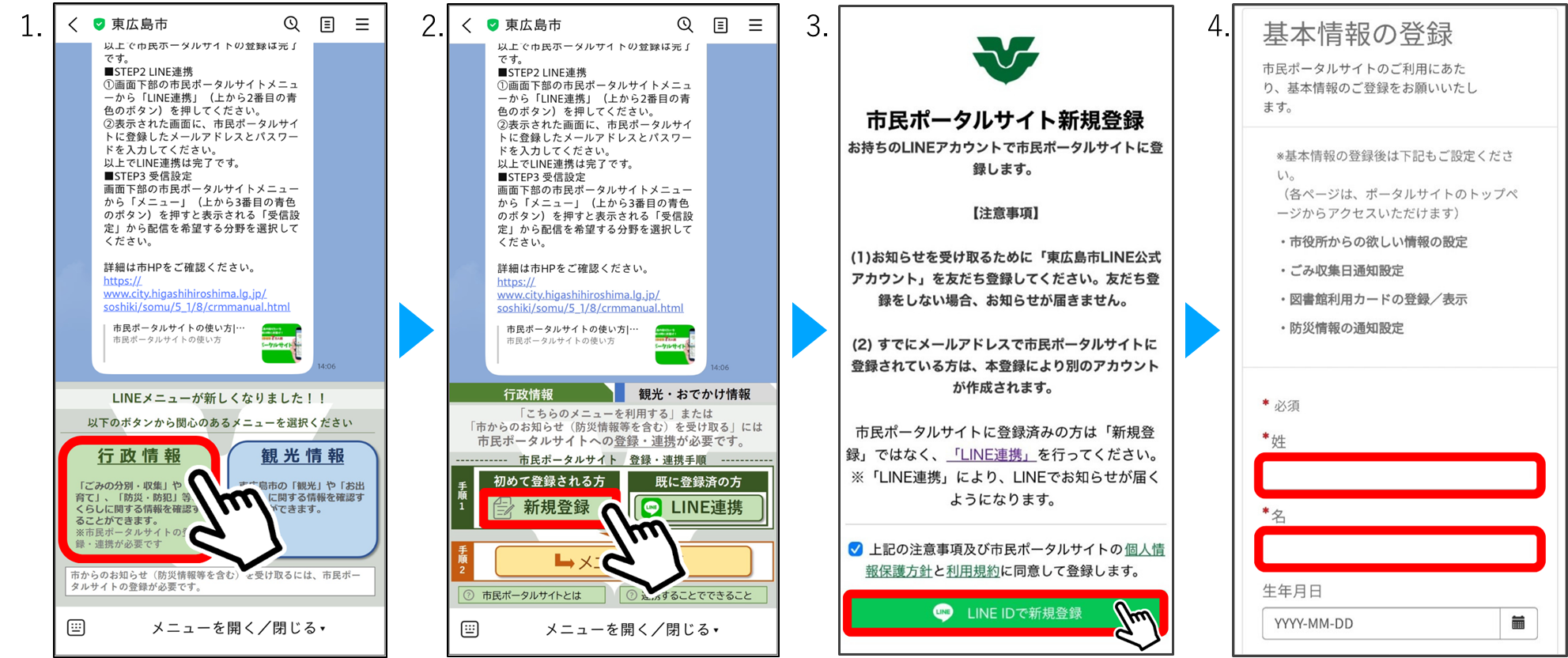
- When you add the official Higashihiroshima City LINE account as a friend, a menu will appear at the bottom of the chat screen. Tap ‘Administrative Information’ (行政情報).
- Tap ‘New Registration’ (新規登録).
- Check ‘I agree to the Privacy Policy and Terms of Use of the Citizen Portal Site and wish to register’ (市民ポータルサイトの個人情報保護方針と利用規約に同意して登録します) then tap ‘Register with LINE ID’ (LINE IDで新規登録).
- Enter your Family Name ₍姓₎ and Given Name ₍名₎, then tap ‘Submit’ (送信).
- When the message ‘Registration Complete’ (登録が完了しました) appears, registration is complete.
(3) Add ‘Higashihiroshima City AI Garbage Guide’ as a Friend
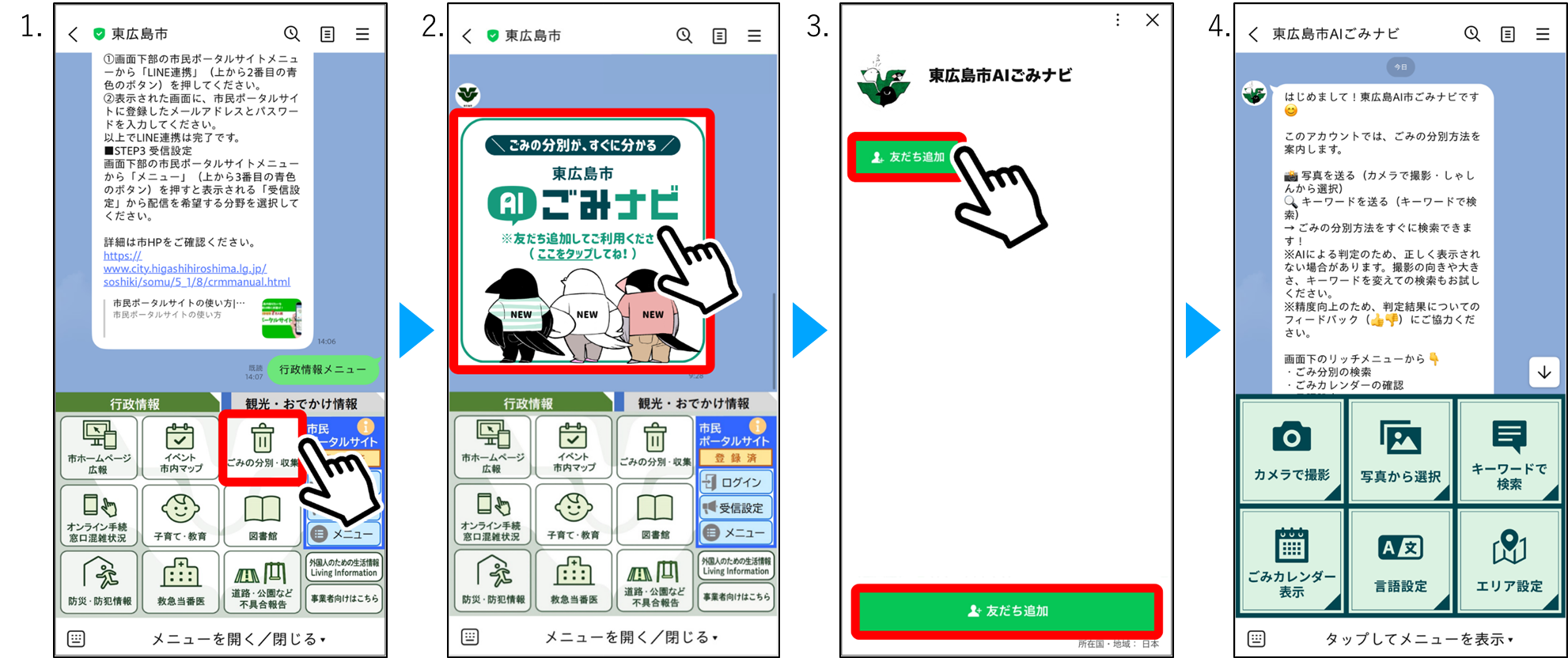
- From ‘Administrative Information’ (行政情報), tap ‘Garbage Separation & Collection’ (ごみの分別・収集).
- Tap the ‘Higashihiroshima City AI Garbage Guide’ image.
- Add the guide as a friend.
- Registration is complete.
How to Use the Guide(利用方法)
From the menu on the Higashihiroshima City AI Garbage Guide home screen:
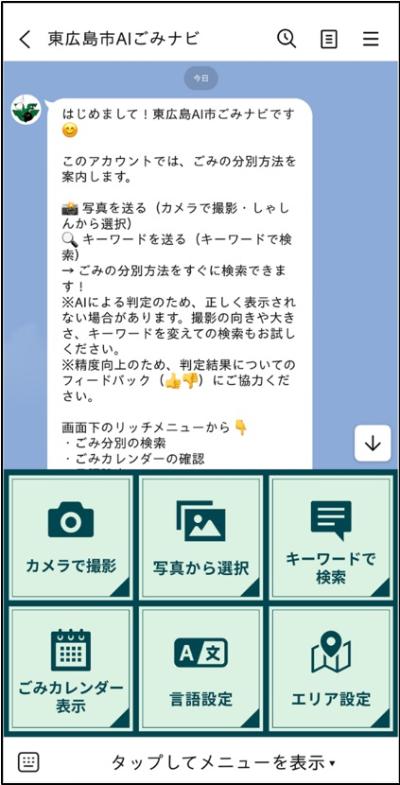
- Tap ‘Language Settings’ (言語設定) and select your language. The service supports nine languages: Japanese, English, Chinese, Vietnamese, Indonesian, Tagalog, Nepali, Portuguese, and Arabic.
- Tap ‘Take a Photo’ (カメラで撮影) and photograph the item you want to identify. You do not need to know the item’s name. Simply upload the photo, and the AI will tell you how to separate it.
- Tap ‘Choose from Photos’ (写真から選択) or ‘Search by Keyword’ (キーワードで検索) to search using an existing photo or by entering a keyword.
- Tap ‘Area Settings’ (エリア設定), and select the area where you live.
- Tap ‘View Garbage Collection Calendar’ (ごみカレンダー表示) to display the household garbage collection schedule for your area. (As of June 22, 2026, this calendar is available only in Japanese.)
Notes:
To help improve the system’s accuracy, please provide feedback on the search results using the 👍 or 👎 buttons.
Because the results are generated by AI, image recognition may not always be accurate. If necessary, try searching again using a different photo angle, image size, or keyword.
Inquiries
Waste Management Division (Haikibutsu-taisaku-ka, 廃棄物対策課): 082-420-0926
Location: 1F Main building
- Please let us know your opinions.
-
Caution:
Please note that we will not respond to the contents entered in this questionnaire.
Please click here for inquiries.
更新日:2026年07月10日